Java / 4 of 6 / 82 dilihat
Java vs C and C++: Different Languages for Different Problems
Java, C, and C++ have similar-looking syntax, but they were designed for different kinds of problems. The best choice depends on how much portability, safety, performance, and low-level control a project requires.
Java is often compared with C and C++ because many parts of its syntax were influenced by them.
All three languages use familiar elements such as:
- braces
{}; - semicolons
;; - variables with declared types;
ifstatements;forandwhileloops;- functions or methods.
However, similar syntax does not mean they work in the same way.
C gives developers direct control over memory and hardware. C++ combines that low-level control with classes, templates, and modern resource-management tools. Java uses a managed runtime called the JVM to improve portability, safety, and developer productivity.
This tutorial will compare them without declaring one language the universal winner.
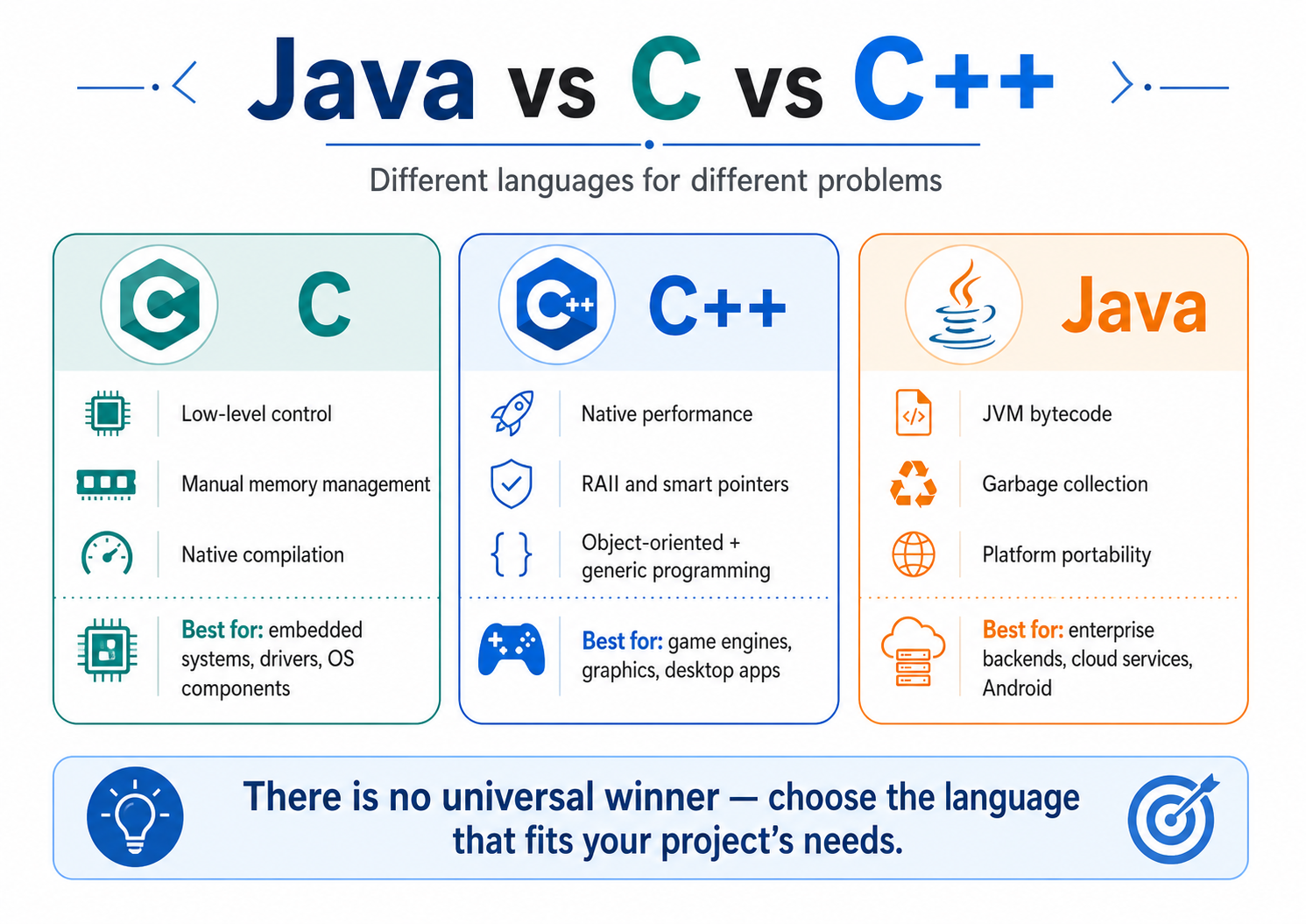
Java, C, and C++ were designed with different priorities. C emphasizes low-level control, C++ combines native control with powerful abstractions, and Java focuses on portability and managed execution.
Series Navigation
Previous: Core Features of Java
Current: Java vs C and C++
Next: Installing the Java Development Kit
Learning Goals
After completing this article, you should be able to:
- describe the main purpose of Java, C, and C++;
- compare native machine code with Java bytecode;
- understand how each language manages memory;
- compare pointers and Java references;
- understand their object-oriented capabilities;
- compare portability, safety, and performance;
- choose a suitable language for common project types.
1. What Is Each Language Mainly Used For?
C
C is closely associated with systems programming.
It gives developers direct access to:
- memory;
- hardware;
- operating-system APIs;
- data layout;
- low-level processor operations.
C is commonly used for:
Embedded firmware
Device drivers
Operating-system components
Networking libraries
Small system utilities
The language is relatively compact, but it gives developers significant responsibility.
C++
C++ began as an extension of C and evolved into a large, multi-paradigm language.
It supports:
- procedural programming;
- object-oriented programming;
- generic programming;
- functional-style programming;
- low-level systems programming.
C++ is commonly used for:
Game engines
Graphics software
Desktop applications
Browsers
Database engines
Robotics and real-time systems
It provides both high-level abstractions and low-level control.
Java
Java is a general-purpose, class-based, object-oriented, and concurrent language.
Java is commonly used for:
Enterprise backends
REST APIs
Banking systems
Cloud services
Android applications
Business software
Data-processing systems
Java hides many low-level machine details and provides automatic memory management through the JVM.
2. Similar Syntax, Different Structure
Let us print the same message in all three languages.
C
#include <stdio.h>int main(void) {
printf("Learning with Pilkupil Lab\n");
return 0;
}
```
C++
#include <iostream>int main() {
std::cout << "Learning with Pilkupil Lab\n";
return 0;
}
```
Java
public class Main {public static void main(String[] args) {
System.out.println(
"Learning with Pilkupil Lab"
);
}
}
```
The programs look related, but their structure is different.
C calls a function from its standard input/output library.
C++ uses an output stream.
Java places the main method inside a class because Java application code is organized around classes.
Java looks more verbose for a tiny program, but that structure becomes useful as an application grows.
3. Compilation and Execution
One of the biggest differences is how these languages normally run.
C and C++
C and C++ compilers usually produce native machine code for a target platform.
C or C++ source code
          │
          │ compiler
          ▼
Native executable
          │
          ▼
Operating system and processor
Example:
gcc main.c -o main
g++ main.cpp -o main
The resulting executable is normally tied to a specific operating system and processor architecture.
A Linux x86-64 executable will not usually run directly on Windows or ARM.
The same source code may be portable, but it generally needs to be compiled again for each target.
Java
Java normally compiles into bytecode.
Java source code
       │
       │ javac
       ▼
Java bytecode
       │
       │ JVM
       ▼
Current operating system and processor
Example:
javac Main.java
java Main
The first command produces:
Main.classThe second command launches the JVM and runs the bytecode.
A compatible JVM can execute the same class file on different systems.
One Java class file
        │
        ├── Windows JVM
        ├── Linux JVM
        └── macOS JVM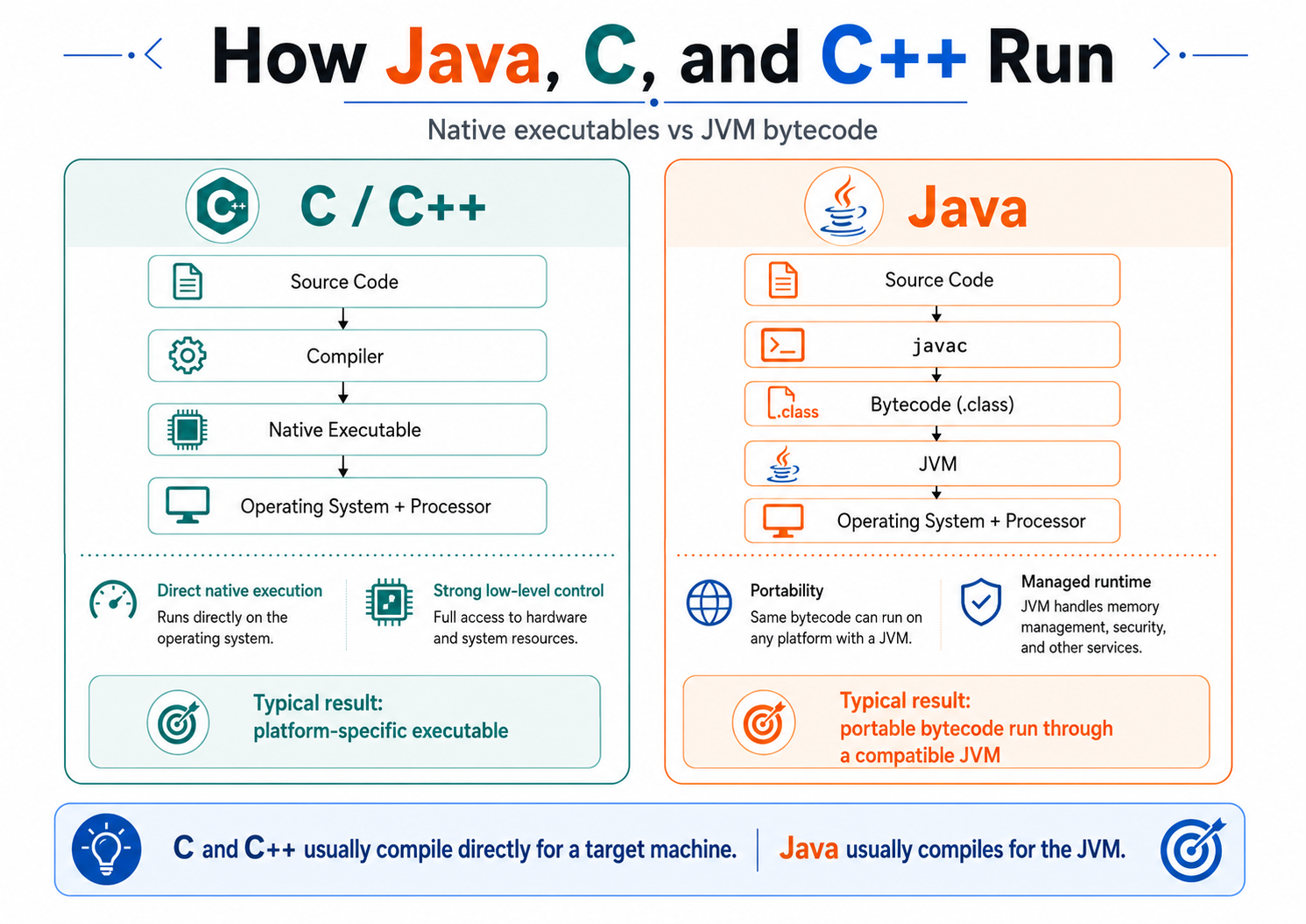
In the common execution model, C and C++ compile into native executables for a target platform, while Java compiles into bytecode that runs through a compatible JVM.
For beginners, the main distinction is:
C and C++ normally compile for a machine, while Java normally compiles for the JVM.
4. Portability
C and C++
C and C++ source code can be portable when it follows the language standard and avoids platform-specific APIs.
However, separate native builds are usually required.
One source project
      │
      ├── Windows build
      ├── Linux build
      └── macOS build
This is called source portability, not necessarily binary portability.
Java
Java bytecode is designed to run through compatible JVMs.
This often allows one compiled application to run across several supported platforms without recompilation.
Portability Is Not Automatic
A Java application can still become platform-specific.
Path path = Path.of("C:\\app\\config.txt");That path only makes sense on Windows.
Applications may also depend on:
- native libraries;
- operating-system commands;
- hardware;
- fonts;
- file permissions;
- platform-specific user interfaces.
Java provides a stronger default portability model, but developers still need to write portable code.
5. Memory Management
Memory management is one of the clearest differences between the three languages.
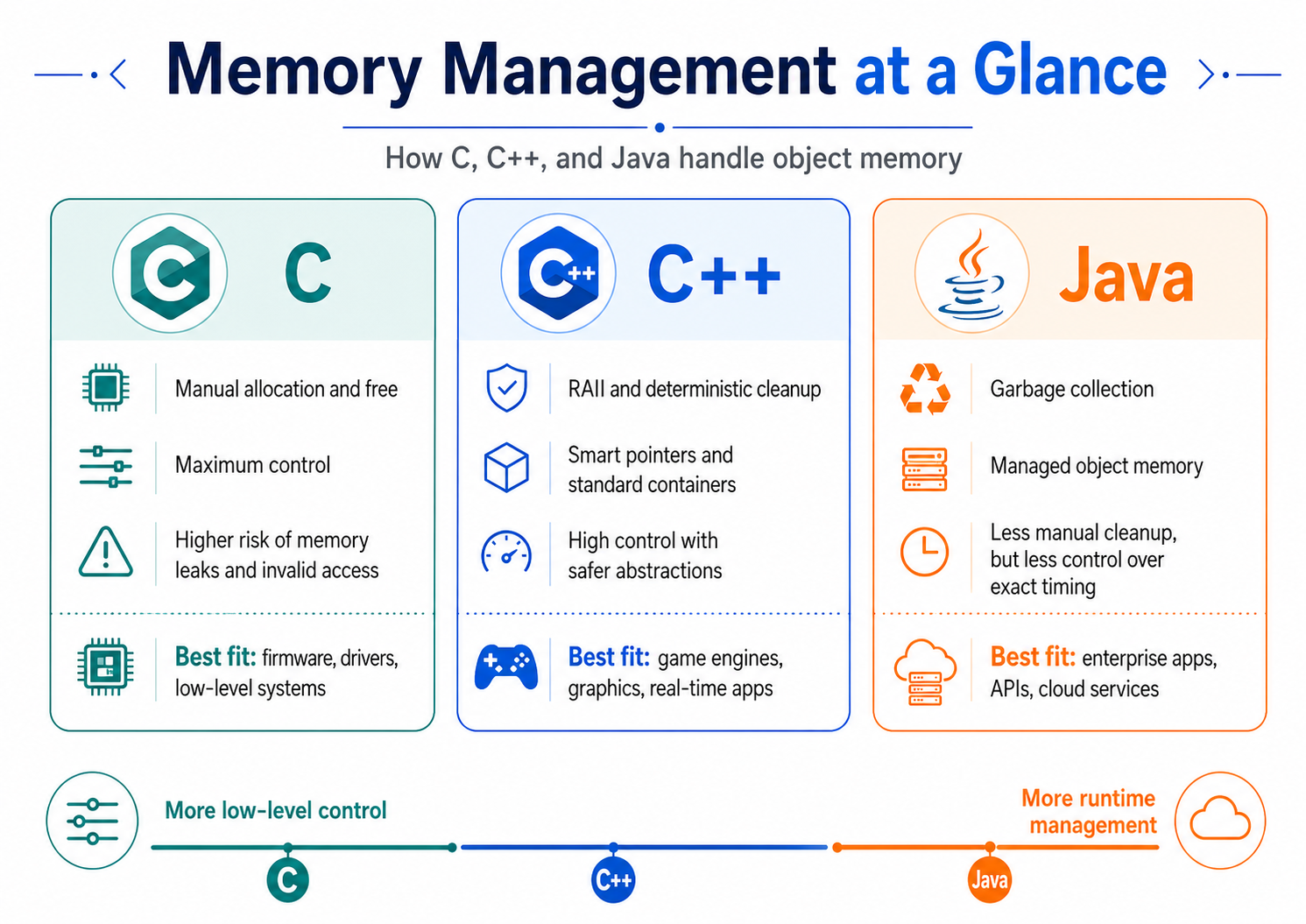
C uses manual allocation and release, modern C++ commonly uses RAII and smart pointers, while Java manages object memory through garbage collection.
C: Manual Memory Management
C allows developers to allocate and release memory directly.
#include <stdlib.h>int *number = malloc(sizeof(int));
if (number != NULL) {
*number = 25;
}
free(number);
```
The developer must remember to call free.
Mistakes can cause:
- memory leaks;
- use-after-free errors;
- double-free errors;
- invalid memory access;
- memory corruption.
The benefit is precise control.
The cost is greater responsibility.
C++: RAII and Deterministic Cleanup
C++ supports manual memory management, but modern C++ encourages safer tools such as:
- stack objects;
- standard containers;
- smart pointers;
- RAII.
RAII means that a resource is connected to an object's lifetime.
#include <memory>auto number = std::make_unique<int>(25);
```
The memory managed by number is released automatically when it leaves scope.
C++ destructors run at predictable points, which is useful for resources such as:
- memory;
- files;
- locks;
- sockets.
Modern C++ usually avoids unnecessary direct use of new and delete.
Java: Garbage Collection
Java uses automatic memory management.
Integer number = 25;The developer does not explicitly release the object's memory.
When the object is no longer reachable, it becomes eligible for garbage collection.
Object is created
      │
      ▼
Application uses it
      │
      ▼
No reference can reach it
      │
      ▼
Garbage collector may reclaim memory
Java's approach reduces several manual-memory errors, but it gives developers less control over exactly when memory is reclaimed.
Java developers must still close external resources such as files, sockets, and database connections.
Memory Trade-Off
C
└── direct control and manual responsibility
C++
└── direct control with deterministic abstractions
Java
└── managed object memory through garbage collection
```
6. Pointers and References
C Pointers
A pointer stores a memory address.
int value = 10;
int *pointer = &value;
printf("%d\n", *pointer);
```
C also allows pointer arithmetic.
This is useful for:
- memory buffers;
- arrays;
- hardware access;
- system programming.
Incorrect pointer use can access invalid or released memory.
C++ Pointers and References
C++ supports raw pointers, references, and smart pointers.
int value = 10;
int& reference = value;
reference = 20;
```
Smart pointers help express ownership:
std::unique_ptr<int>
std::shared_ptr<int>
std::weak_ptr<int>
C++ gives developers several ways to manage object relationships and lifetimes.
Java References
Java uses references to objects.
Course first = new Course("Java");
Course second = first;
Both variables refer to the same object.
first  ──┐
         ├── Course object
second ──┘
Ordinary Java code does not expose raw memory addresses or pointer arithmetic.
Java references can still be null.
Course course = null;
course.showProgress();
This produces a NullPointerException.
Java removes many pointer-related risks, but it does not remove all reference-related errors.
7. Object-Oriented Programming
C
C is not a class-based object-oriented language.
Developers organize programs using:
- structures;
- functions;
- headers;
- modules;
- function pointers.
struct Course {
    const char *title;
    int completed_lessons;
};
Object-oriented patterns can be created manually, but the language does not provide classes or inheritance directly.
C++
C++ provides a flexible object model.
It supports:
- classes;
- constructors;
- destructors;
- inheritance;
- virtual methods;
- multiple inheritance;
- operator overloading;
- templates.
class Course {
private:
    std::string title;
public:
Course(std::string value)
: title(std::move(value)) {
}
};
```
C++ does not force every program to use object-oriented design.
Java
Java is class-based and strongly object-oriented.
It supports:
- classes;
- constructors;
- inheritance;
- interfaces;
- abstract classes;
- polymorphism;
- access modifiers.
public class Course {private final String title;
public Course(String title) {
this.title = title;
}
}
```
Java does not allow a class to extend more than one class.
A class can instead implement multiple interfaces.
class ReportService
        extends BaseService
        implements Printable, Exportable {
}
Java's object model is more restricted than C++, but it is often easier to understand and maintain.
8. Operator Overloading and Multiple Inheritance
These two features show how Java deliberately reduces some C++ flexibility.
Operator Overloading
C++ allows custom operator behavior.
Point result = first + second;A class can define what + means for its objects.
Java does not allow general user-defined operator overloading.
Java normally uses a method:
Point result = first.add(second);The Java approach is more explicit, while C++ can be more expressive.
Multiple Inheritance
C++ allows a class to inherit from several classes.
Java allows only one superclass.
class Device extends BaseDevice
        implements Scannable, Printable {
}
Java uses interfaces to support multiple behavior contracts without multiple class inheritance.
The restriction reduces ambiguity but also reduces flexibility.
9. Error Handling
C
C commonly uses:
- return codes;
- special values;
errno;- output parameters.
FILE *file = fopen("data.txt", "r");if (file == NULL) {
perror("Unable to open file");
return 1;
}
```
The developer must remember to check the result.
C++
C++ supports error codes and exceptions.
try {
    throw std::runtime_error("Unable to load data");
} catch (const std::exception& error) {
    std::cerr << error.what() << '\n';
}
When an exception moves through the call stack, destructors release local resources.
Java
Java uses exceptions extensively.
try {
    int value = Integer.parseInt("abc");
} catch (NumberFormatException exception) {
    System.out.println("Invalid number");
}
Java includes checked and unchecked exceptions.
No error-handling model is automatically perfect.
Return codes can be ignored, and exceptions can be caught incorrectly.
10. Performance
Performance comparisons should be treated carefully.
Performance depends on:
- algorithms;
- data structures;
- compiler quality;
- memory use;
- input and output;
- database access;
- network latency;
- hardware;
- application design.
C and C++
C and C++ normally compile ahead of time into native machine code.
They provide:
- direct memory access;
- control over data layout;
- low runtime requirements;
- predictable native deployment;
- strong compiler optimization.
These qualities are important for:
Real-time systems
Game engines
Embedded software
Graphics
Low-level libraries
Java
Java normally runs through the JVM.
The JVM can observe application behavior and JIT-compile frequently executed bytecode into optimized native code.
Bytecode
    │
    ▼
Runtime profiling
    │
    ▼
Frequently used code identified
    │
    ▼
Optimized native instructions
Java can provide strong performance for long-running applications.
Its trade-offs may include:
- JVM startup;
- warm-up time;
- garbage collection;
- additional runtime memory.
Which One Is Faster?
There is no universal answer.
C and C++ usually provide more predictable low-level control.
Java provides adaptive runtime optimization and managed execution.
For many web and business applications, database and network performance matter more than small language-level differences.
Use realistic benchmarks and profiling instead of assumptions.
11. Safety
C
C permits operations that can become unsafe when used incorrectly.
Examples include:
- invalid pointer access;
- out-of-bounds array access;
- use-after-free;
- incorrect memory allocation;
- unsafe format strings.
C++
Modern C++ offers safer tools:
- standard containers;
- smart pointers;
- RAII;
- strong types;
- bounds-checked methods.
However, it still allows raw pointers, manual memory management, and unchecked operations.
Java
Java provides safer defaults through:
- array bounds checks;
- garbage collection;
- runtime type checks;
- bytecode verification;
- no ordinary pointer arithmetic.
Java can still contain:
- null reference errors;
- logical bugs;
- concurrency problems;
- resource leaks;
- security vulnerabilities.
Java improves memory safety, but it does not guarantee correct software.
12. When Should You Use Each Language?
Choose C When You Need
- direct hardware access;
- a very small runtime;
- embedded firmware;
- precise memory layout;
- operating-system integration;
- compatibility with existing C libraries.
Typical projects:
Microcontroller firmware
Device driver
Kernel component
Small native library
Choose C++ When You Need
- native performance;
- deterministic resource management;
- advanced abstractions;
- control over data layout;
- graphics or game-engine development;
- real-time or latency-sensitive processing.
Typical projects:
Game engine
Graphics application
Database engine
Browser component
Robotics system
Choose Java When You Need
- cross-platform server deployment;
- automatic memory management;
- a mature backend ecosystem;
- strong development tooling;
- long-term maintainability;
- high concurrency;
- productive application development.
Typical projects:
Enterprise backend
REST API
Banking system
Cloud service
Android application
Business workflow platform
Java may be less suitable when exact memory layout, direct hardware control, or deterministic destruction is essential.
13. Practical Decision Questions
Before choosing a language, ask:
Does the Project Need Direct Hardware Access?
C or C++ is usually more appropriate.
Does the Project Need Deterministic Resource Cleanup?
C++ provides RAII and predictable destructors.
Does the Application Need Easy Cross-Platform Deployment?
Java bytecode and compatible JVMs can simplify deployment.
Is It a Long-Lived Business System?
Java's ecosystem, tooling, and managed runtime are often valuable.
Is Low-Level Performance the Main Requirement?
C or C++ may provide the required control.
The decision should still be supported by measurements.
What Does the Team Already Know?
A suitable language that the team can maintain is often better than a theoretically perfect language that nobody understands well.
14. Common Misconceptions
“Java Is Better Than C and C++”
No language is best for every project.
They solve different kinds of problems.
“C++ Is Only C with Classes”
Modern C++ includes templates, smart pointers, lambdas, concurrency tools, and a large standard library.
“Java Has No Pointers”
Java has object references.
It does not expose raw pointer arithmetic in ordinary code.
“Garbage Collection Prevents All Memory Problems”
Java applications can still retain unnecessary objects and leak external resources.
“Native Code Is Always Faster”
Performance depends on the workload, algorithms, compiler, runtime, and architecture.
“C and C++ Are Not Portable”
Their source code can be portable, but native executables normally need separate builds for each target.
15. Comparison Summary
C
├── Procedural foundations
├── Native compilation
├── Manual memory management
├── Raw pointers
└── Strong low-level control
C++
├── Multi-paradigm language
├── Native compilation
├── RAII and smart pointers
├── Classes and templates
└── High control with greater complexity
Java
├── Class-based language
├── JVM bytecode
├── Garbage-collected memory
├── Managed object references
└── Portability and safer defaults
```
The general trade-off is:
More low-level control
        ▲
        │
     C / C++
        │
       Java
        ▼
More runtime management
This is not a performance ranking.
16. Mini Exercise
Choose the most likely language for each project.
- Firmware for a small microcontroller.
- A cross-platform enterprise REST API.
- A modern 3D game engine.
- An operating-system device driver.
- A banking backend expected to run for many years.
- A native image-processing library.
Suggested Answers
- C — direct hardware access and a small runtime.
- Java — cross-platform JVM deployment and a mature backend ecosystem.
- C++ — native performance and graphics tooling.
- C or C++ — low-level operating-system integration.
- Java — managed runtime, tooling, and long-term maintainability.
- C++ — native optimization with higher-level abstractions.
These are general recommendations, not absolute rules.
17. Knowledge Check
- What do C and C++ normally compile into?
- What does Java normally compile into?
- What is the difference between source and binary portability?
- Who releases manually allocated memory in C?
- What is RAII in C++?
- What does Java use instead of raw pointers?
- Does Java support multiple class inheritance?
- Why can Java achieve strong runtime performance?
- Which language is always the fastest?
- When is C or C++ usually more suitable than Java?
Suggested Answers
- Native machine code for a target platform.
- JVM bytecode in
.classfiles. - Source portability means code can be compiled on several platforms; binary portability means the same compiled file can run on them.
- The developer normally releases it using functions such as
free. - It connects resource lifetime to object lifetime so destructors release resources when objects leave scope.
- Managed object references.
- No. A class extends one superclass but can implement multiple interfaces.
- The JVM can profile code and JIT-compile frequently executed paths.
- None. Performance depends on the workload and implementation.
- When direct hardware access, precise memory control, deterministic cleanup, or low-level native integration is required.
Key Takeaways
- C, C++, and Java have similar syntax but different priorities.
- C focuses on compact language features and direct low-level control.
- C++ combines native control with powerful abstractions.
- Java uses the JVM to improve portability and runtime safety.
- C and C++ normally produce platform-specific native executables.
- Java normally produces portable JVM bytecode.
- C uses manual memory management.
- Modern C++ commonly uses RAII and smart pointers.
- Java uses garbage collection for object memory.
- C and C++ expose pointers; Java exposes managed references.
- C++ supports multiple class inheritance and operator overloading; Java restricts them.
- No language is always faster or better.
- The correct choice depends on the project's requirements and the team's expertise.
What's Next?
Now that we understand how Java differs from C and C++, we are ready to prepare our Java development environment.
In the next tutorial, we will learn how to:
Install the Java Development Kit on Windows, Linux, and macOS
We will also verify the installation using:
java --version
javac --version
Image Publishing Notes
The Markdown image paths in this article assume that the files are published under:
/assets/images/tutorial/java/Upload these three image files to that folder:
java-vs-c-vs-cpp-comparison-guide.png
how-java-c-and-cpp-run.png
memory-management-java-c-cpp.png
For Medium, publish the article on Pilkupil first and then import the public article URL into Medium. Medium can retrieve the images from the website, while the Pilkupil article remains the original source.
Official Sources and Further Reading
- Java Language Specification, Java SE 26 — Introduction
- Java Virtual Machine Specification, Java SE 26 — Introduction
- ISO C Standard Information
- ISO C++ Standard Information
- Standard C++ — The Standard
- C++ Core Guidelines
This article is part of the Java tutorial series on Pilkupil Lab.