Dev Logs / 4 min read
VS Code 1.127: Smarter Agents, Safer Browser, and a Much Tidier Workspace
Visual Studio Code dropped version 1.127 on July 1, 2026, and this one's a solid update — especially if you've been leaning into the AI/agent workflow. Browser tools are now generally available, terminal commands get sandboxed for safety, and there are genuinely useful improvements to how you organize and track agent sessions.
Here's what's worth your attention.
📺 All video demos below are from the official VS Code release notes.
1. Agents Window: Finally, Some Order in the Chaos
If you regularly run multiple agent sessions at once, the sessions list can turn into a mess fast. Two new features help clean that up.
Session groups — You can now create custom groups to organize related sessions, with collapsible headers to tidy things up. Each group also gets quick actions: start a new session directly inside the group, or mark all of its sessions as done in one go.
Drag and drop — Reorder sessions, drag them into groups, pin them, or select multiple sessions and move them together as a block.
Chat Input Banners
This one stands out as a practical workflow improvement. When an agent session has an open pull request, VS Code now shows a banner right above the chat input with direct actions:
- CI failures — Shows how many checks failed, with a "Fix Checks" button to hand it back to the agent, or "Reveal Checks" to inspect them.
- PR comments — When review comments come in, you can either "Address Comments" (agent handles them) or "Reveal Comments" (opens in the editor).
Editor Gutter Feedback
You can now leave feedback directly from the editor gutter: hovering over a line reveals an Add Feedback glyph, and selecting it drops a comment right there — no more describing which line you mean in the chat.
Consistent Session Header Pills
The action row under the session title now renders as uniform, compact pills — a Workspace pill showing the workspace icon and label, and a Changes pill that stays in sync with the actual number of changed files.

Cleaner, more consistent session headers
2. Multi-Chat Sessions Get Better
The multi-chat feature gets a round of improvements:
- Close, reopen, and delete chats — A tab strip appears when more than one chat is open. Closing a tab hides it rather than discarding it — bring it back from the Conversations dropdown.
- Fork into a peer chat — Forking a conversation now creates a new peer chat in the same session, inheriting the conversation up to the fork point.
3. Terminal Sandboxing (macOS & Linux)
Agent-invoked terminal commands used to mean a constant stream of approval prompts. VS Code 1.127 changes that on macOS and Linux by running those commands inside a sandbox: network access is blocked, filesystem access is restricted.
The agent can work more autonomously without the interruptions, and anything that needs elevated access will still ask for your approval explicitly.
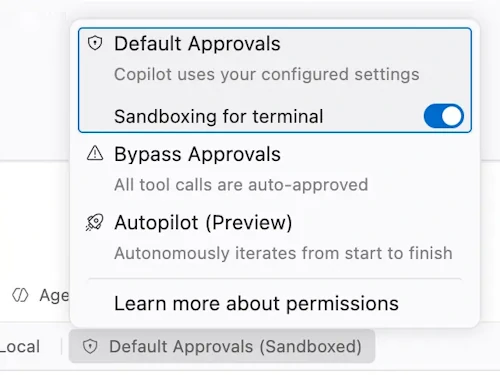
You can turn sandboxing off from the Permissions dropdown if needed
4. Browser Tools Are Now Generally Available
After several preview milestones, browser tools for agents are officially GA and enabled by default. An agent can now open pages, read content and console errors, take screenshots, click, type, and navigate to verify its own work — all without an external MCP server.
Per-Site Browser Permissions
Each website can now request its own permissions — geolocation, camera, microphone, Bluetooth, USB, clipboard, and more. VS Code prompts before granting anything, just like a regular browser would.
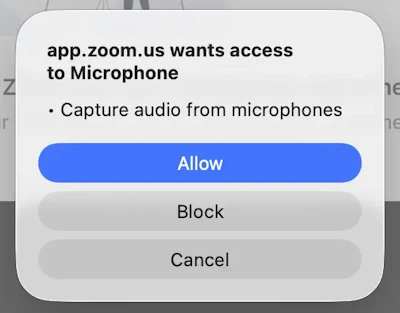
VS Code now asks before granting page access to sensitive APIs
5. Subagent Credit Transparency
When an agent delegates work to a subagent, you can now hover over the subagent section in a chat response to see the exact AI credit breakdown for what it handled.
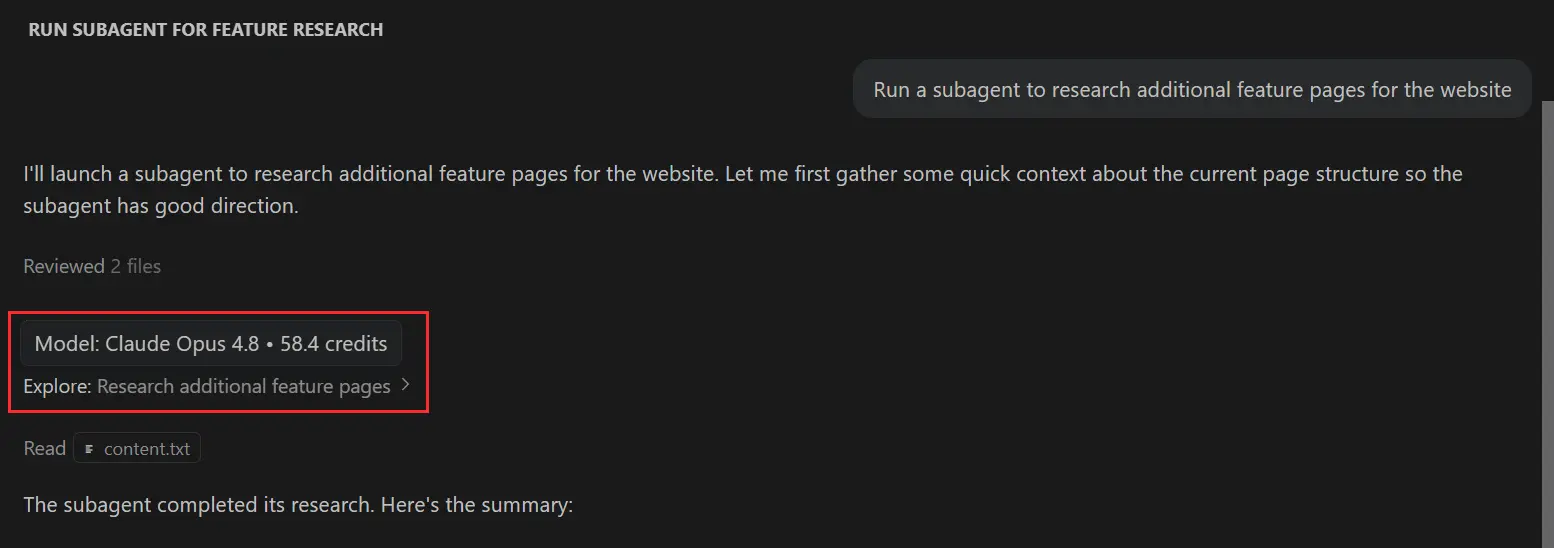
Small feature, but useful if you're paying attention to your Copilot usage.
6. Built-in Ollama Provider Is Deprecated
If you've been using local Ollama models through VS Code's built-in BYOK provider, it's time to migrate. The built-in Ollama provider is now deprecated in favor of the official Ollama VS Code extension. Install the extension and remove the built-in provider now.
7. File-based Managed Settings for Enterprise
Administrators can now deliver managed GitHub Copilot settings from a managed-settings.json file at a well-known OS path — useful for machines not enrolled in a device management system.
- macOS:
/Library/Application Support/GitHubCopilot/managed-settings.json - Linux:
/etc/github-copilot/managed-settings.json - Windows:
%ProgramFiles%\GitHubCopilot\managed-settings.json
Wrapping Up
VS Code 1.127 is one of those updates where the individual features might seem small in isolation, but together they noticeably tighten up the agent workflow. Session groups and drag-and-drop make a busy Agents window actually manageable. Browser tools going GA is a big milestone for agent-assisted web development. And sandboxing is a quiet but meaningful step toward agents that can work more independently without sacrificing safety.
To update now, go to Help > Check for Updates in VS Code.
Summarized from the official Visual Studio Code 1.127 release notes, released July 1, 2026.