Java / 1 of 6 / 56 views
Getting Started with Java: A Language That's Still Relevant Today
If you're just starting out with programming, or you've spent years with Kotlin and are curious where it all came from, Java is a great place to begin. This is the first article in a Java tutorial series on Pilkupil Lab, and we'll start with the basics: what Java actually is, why it's still so widely used, and how it works under the hood.
What Is Java?
Java is a general-purpose programming language, meaning it can be used to build almost any kind of application — desktop software, large-scale enterprise backends, Android apps, and even embedded systems on IoT devices.
Java was first released by Sun Microsystems in the mid-1990s, and has since grown into one of the most widely used languages in the software industry. It's now maintained by Oracle, with a new version released roughly every six months.
For context if you're coming from modern Android development: Kotlin, the language now standard for Android, actually runs on the same foundation as Java — the Java Virtual Machine (JVM). So understanding Java will also help you understand a lot of concepts that carry over directly into Kotlin.
Why Is Java Still Around?
There are a few solid reasons Java has remained one of the top language choices, especially in enterprise environments:
- Portability. Java's old slogan, "Write Once, Run Anywhere," still holds up. Java code compiles into bytecode that can run on any platform, as long as a JVM is available for it.
- A mature ecosystem. Frameworks like Spring, along with countless libraries and tools, have been developed and refined over decades — so a solution for almost any common problem usually already exists.
- Statically typed. Types are checked at compile time rather than at runtime, which catches a lot of mistakes early, before the code ever runs.
- Automatic memory management. Java has a garbage collector that handles memory allocation and cleanup, so developers don't need to manage memory manually the way they would in C or C++.
- Strong industry backing. Many banking systems, large-scale e-commerce platforms, and the majority of early Android apps were originally built on Java.
JDK, JRE, and JVM: Three Terms That Trip Up Beginners
These three acronyms get mixed up constantly when you're starting out. Here's the short version:
┌────────────────────────────────────────────────┐
│                     JDK                        │
│         (Java Development Kit)                 │
│   javac, debugger, and other dev tools         │
│                                                │
│   ┌─────────────────────────────────────────┐  │
│   │                 JRE                     │  │
│   │       (Java Runtime Environment)        │  │
│   │      Core class libraries + JVM         │  │
│   │                                         │  │
│   │   ┌──────────────────────────────────┐  │  │
│   │   │              JVM                 │  │  │
│   │   │      (Java Virtual Machine)      │  │  │
│   │   │  Runs compiled bytecode (.class) │  │  │
│   │   └──────────────────────────────────┘  │  │
│   └─────────────────────────────────────────┘  │
└────────────────────────────────────────────────┘
JDK ⊃ JRE ⊃ JVM — each layer includes everything inside it
```
- JVM (Java Virtual Machine) is the engine that actually runs Java bytecode. It's what allows Java to run on different operating systems without needing to recompile the code for each platform.
- JRE (Java Runtime Environment) bundles the JVM together with the standard libraries needed to run Java applications. If you only need to run a Java program (not write one), the JRE alone is enough.
- JDK (Java Development Kit) is the full package. On top of the JRE, it includes the compiler (
javac), a debugger, and other tools needed to actually write and build Java programs.
So the relationship is roughly: the JDK includes the JRE, and the JRE includes the JVM. To write and compile Java code, you'll need the JDK installed on your machine.
How a Java Program Actually Runs
Unlike languages that are interpreted line-by-line, or compiled directly into native machine code, Java works in two stages:
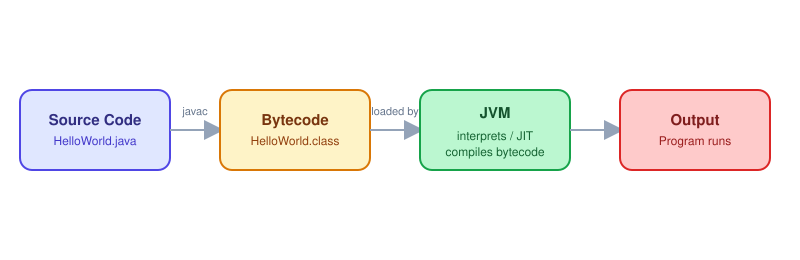
- Source code (
.java) is compiled byjavacinto bytecode (.classfiles). - That bytecode is executed by the JVM, which translates it into instructions the underlying operating system can understand.
This two-step approach is exactly what makes "write once, run anywhere" possible — as long as a matching JVM exists for the target platform.
Your First Java Program
To close out this first article, let's look at the simplest possible Java program:
public class HelloPilkupil {
    public static void main(String[] args) {
        System.out.println("Hello from Pilkupil Lab!");
    }
}
A few things worth noting:
- The file name must exactly match the public class name — so this file must be named
HelloPilkupil.java. - The
mainmethod is the entry point — this is where the JVM starts executing your program. System.out.println()is the most common way to print text to the console.
What's Next
In the next part of this series, we'll cover installing the JDK, taking a closer look at the basic structure of a Java program, and getting into variables and data types. If you're coming from a Kotlin/Android background like I am, some of this will feel familiar — but there are also some fundamental differences worth understanding before moving on to more advanced topics.
This article is part of the Java tutorial series on Pilkupil Lab.